Please save us to your phone — otherwise you will lose us and go hunting
My dears, I have one small favour to ask, and I shall not let it go until I have asked it.
Most of you find us by accident: you needed to trim a song, you dropped in, you got it done, you closed the tab. And a month later — "where was that site that had all of it?" And you will not find it again, will you. So here it is: we can be saved as an app. One button, and an icon appears on your desktop or on your phone's home screen, just like any other app. And then you will not lose us again.
On an iPhone it goes through Share → Add to Home Screen, and the button itself will walk you through the steps. On a computer, in Chrome or Edge, look for the install icon at the right-hand end of the address bar.
And a lovely little bonus: after that, some of the tools keep working even without internet. On a plane, on the underground, at a cottage where you only get a signal if you stand on a stool — a few things will open anyway.
And now the news I started this whole conversation for. We are already past 630 tools, and by the end of the month we want to reach 700. That is twenty-three and a half days and an awful lot of work. So the icon will come in handy soon — there will be plenty of reasons to drop by.
Install it now, would you? Before you forget. It takes two seconds. 💛
Залишати коментарі тут можуть лише зареєстровані користувачі з підтвердженою електронною адресою.
УвійтиThe Ikigai Test is open — the best purpose test you have seen
We made the Ikigai Test. And I will say it honestly — it is the best purpose test you have seen. Others draw four circles copied off the internet and call it a test — weak!
What is ikigai? A Japanese notion with centuries of history: «that which makes life worth living». It is named among the secrets of Okinawa's long-livers, and science has studied it seriously since the 1960s — the idea has passed the test of both time and research. One legend we will not sell you: the famous four-circle chart is no ancient scroll — it was drawn in the West in our own day. Truth is dearer than a pretty tale, so the method is laid out honestly, and the feeling of a full life is measured by the only open, validated scale — Ikigai-9.
Why take it? Because the question «am I doing the right thing with my life?» drains more strength than any work does. In seven minutes the test shows where you stand: a map of four directions — what you love, what you are good at, what people need, and what pays — plus your archetype, with every number explained in plain words. You get a working answer, not a label: which side of yours is strong, what is missing, and the three questions to start with so your work both delights and provides. And in the Workshop the map of meaning is built by your own hands, from your own pursuits — you will see which of them sits closest to your ikigai.
Forty-one questions — a tremendous result. Take it — and judge for yourselves!
— The Tembrica team
Залишати коментарі тут можуть лише зареєстровані користувачі з підтвердженою електронною адресою.
УвійтиI asked an AI to make a video about Tembrica
One brief: introduce the site, using the site's own tools. The voice is synthetic, the footage is real.
What does what:
- Screen capture Screen Recorder
- Voice Text to speech
- Music Background music
- Mixing Audio mixer
- Mastering Music mastering
- Sound on video Audio in video
- Subtitles Auto captions
- Editing Video trim
So your own AI can do the same, we opened an API. The key lives in Settings → API: hand it to your model and ask. For example: “make a video about the Tembrica site with a synthesised voice-over.”
The API launched today, and not every tool is available to an AI yet. If something does not work — write to us.
— The Tembrica team
Залишати коментарі тут можуть лише зареєстровані користувачі з підтвердженою електронною адресою.
УвійтиLook up what mastering costs on any freelance marketplace. Someone takes those orders every day
Look up what a mastered track costs on any freelance marketplace. Then look up transcription, priced per audio minute. Those are not our numbers — they are other people’s rate cards, and anyone can check them in a minute.
Orders like these sit on job boards every day. Somebody takes them.
With a Premium account, mastering runs in batches of up to a hundred files and comes back as a single archive. Transcription of a recording up to four hours long goes to our server — you can close the tab and start on the next job.
The rights to the result are yours; that is written into our Terms.
Two things worth knowing before the first order. Someone else’s recording is transcribed with the consent of the people speaking on it. Someone else’s track is mastered when the client holds the rights.
We promise no income: you find the client, you agree the terms, you deliver, and you check the result before handing it over. We are only the tool in the middle of that chain.
If you are not doing this yet — somebody else is.
— The Tembrica team
Залишати коментарі тут можуть лише зареєстровані користувачі з підтвердженою електронною адресою.
УвійтиA tool ships 95% finished. The remaining 5% is yours
There is something about this project worth saying out loud.
We release a tool when it is 95% done. Not 100. The remaining 5% is what cannot be seen from the inside: a format nobody here thought of; a button that is not where people look for it; a file that opens for everyone except you. That five percent comes from you.
It has worked this way from the start — nine months. There are two of us, no office, no investors; everything that comes in from Premium accounts goes straight back into the tools. At this size, the only way to do it well is not to do it alone.
What you can do right now, if you feel like helping:
Something broke? Write to us — what you were doing, which file, what happened. Three lines save us half a day and save you the wait.
Something irritating? That is a bug too. «It works, but it drives me mad» is the most valuable report there is, and the rarest.
Missing a tool? Describe the task, not the solution. «Every week I need to turn these files into those» is far more useful than «build a converter».
Using something similar elsewhere? Tell us what it fails to do for you. We are not competing — we are looking for the gaps nobody has closed.
Want to test things early? Write «I want to test». We owe our volunteers a good half of the fixes, and newcomers are always welcome.
And thank you to everyone already doing this. There are not two of us — there are many of you, and you built this place together with us.
Where to start if you want to try something right now. We have just opened the animated avatar maker: it turns a photo or a short video into a living avatar or a sticker — boomerang loop, circular mask, rotating ring, transparent background, presets for Telegram, Discord, WhatsApp and Slack. It is brand new, which means you are looking at exactly those 95%. Try it on your own photo and tell us where it trips: that will be the remaining five.
— The Tembrica team
Залишати коментарі тут можуть лише зареєстровані користувачі з підтвердженою електронною адресою.
УвійтиA universal converter is live: drop any file — it works out what it is and offers what to turn it into
Most of us keep a small pile of converters bookmarked: one for images, one for video, and a third one that's "the good one for PDFs". We tried to make a single tool enough.
The Universal File Converter looks inside the file rather than at its extension. If something is called photo.jpg but is really a WebP, the tool says so out loud and converts what is actually there.
It takes audio, video, images (HEIC and TIFF included), PDFs, Word, EPUB, FB2, PowerPoint, Excel and OpenDocument files, archives, subtitles, data tables and fonts. It also crosses between categories: pull the audio out of a video, grab a still frame from it, make a PDF out of a photo, turn a PDF back into Word. Mixed batches are welcome — drop a photo, a clip and a spreadsheet together, give each its own target and take everything away in one archive. Most conversions run right in your browser.
Our ambitions are modest: replace every converter on the internet. Within reason, of course — turning Monday into Friday is still beyond us.
The tool is new, so here is our ask: try it on your own files and see where it trips. If a format you need is missing, the page has a "Missing a format?" form — that queue is exactly how we decide what to add next.
— The Tembrica team
Залишати коментарі тут можуть лише зареєстровані користувачі з підтвердженою електронною адресою.
УвійтиA file from the computer to the phone — no USB stick, no cable, no Wi-Fi
A familiar situation: the presentation for tomorrow's lesson is on the school computer and you need it on your phone. Or the other way round — you photographed the children's work and now the pictures have to go into a document on the computer. And then it turns out the USB stick is at home, the school Wi-Fi will not let a personal phone in, the cable is the wrong one, and signing into your own mail on somebody else's computer is something you would rather not do — and rightly so.
We are opening QR file transfer. It needs none of that: it shows your file on the screen, and you simply film that screen with the other device's camera. No cables, no internet, nothing to install, no passwords.
How can that possibly work. You have surely seen a QR code — the little black-and-white square you point a camera at in a café or a station. It is not a picture, it is packed-up text, and about a page of it fits into one square. Now imagine there is not one square but twenty or thirty per second. The screen flickers, the camera watches, and the file flows from one device to the other straight through the air. On light. As if you were holding up page after page while a colleague photographed them — only thirty pages a second.
And if your hand shakes? Nothing bad happens, and this is the loveliest part of how it is built. The program does not care which frames you caught — only how many. Miss one and you will catch it on the next lap, as if a poem were being dictated to you over and over. It simply takes a little longer. At the end it checks by itself that the file came through whole, and tells you plainly whether it did.
You need two devices: one with a screen, one with a camera. Nothing else. One thing worth saying plainly: the device that RECEIVES is the one with the camera. Computer to phone always works — every computer has a screen. Receiving on a computer works only if it has a camera: laptops have one built in, but a desktop with no camera cannot receive a file this way. A document or a spreadsheet takes a few seconds, a photograph half a minute, a presentation with pictures a minute or two — and during that time both devices are best put down and left alone. A film is not what this is for. You can also send plain text — a Wi-Fi password, a link, a number: on the second device it arrives with a Copy button already waiting.
And a request. It works for us. But "us" means our screens and our cameras, and everyone's are different: one screen is dimmer, one camera simpler. Try it on two of your own devices and write in the comments whether it worked. Especially write if it did not: there is a switch that makes the picture larger and easier for the camera — turn it down a step and tell us whether that helped. That is exactly what we cannot find out about your devices on our own.
Залишати коментарі тут можуть лише зареєстровані користувачі з підтвердженою електронною адресою.
УвійтиThe backstory: why we started repairing files — and what this week brings
Every big story starts with a small catastrophe. Ours started with a letter: "Please help — the recording of my mom's voice won't open. It's the only one I have." Back then we didn't know there would be hundreds of letters like it.
That's how Repair Audio was born. Then came the people whose videos wouldn't open — and Repair Video appeared. Then the photos, and we built Photo Repair. Today these tools are used every single day, and every repaired file is somebody's memory brought back.
But these aren't the only files that break. Archives, documents, presentations — every format has its own way of dying. So our plan for the coming week is simple: learn to bring those back to life too. If something of yours won't open — don't delete it. Soon there will be a place for it on Tembrica.
— The Tembrica team
Залишати коментарі тут можуть лише зареєстровані користувачі з підтвердженою електронною адресою.
УвійтиBring the faces in your old photos back into focus
In family albums the dearest faces are often the blurriest: a tiny print, a shaky camera, decades in the sun. You scan it — and the eyes are barely there, just pale smudges. We're launching Old Photo Restoration: a neural network finds every face in the picture and brings back its features — eyes, teeth, contours — right in your browser.

 До Після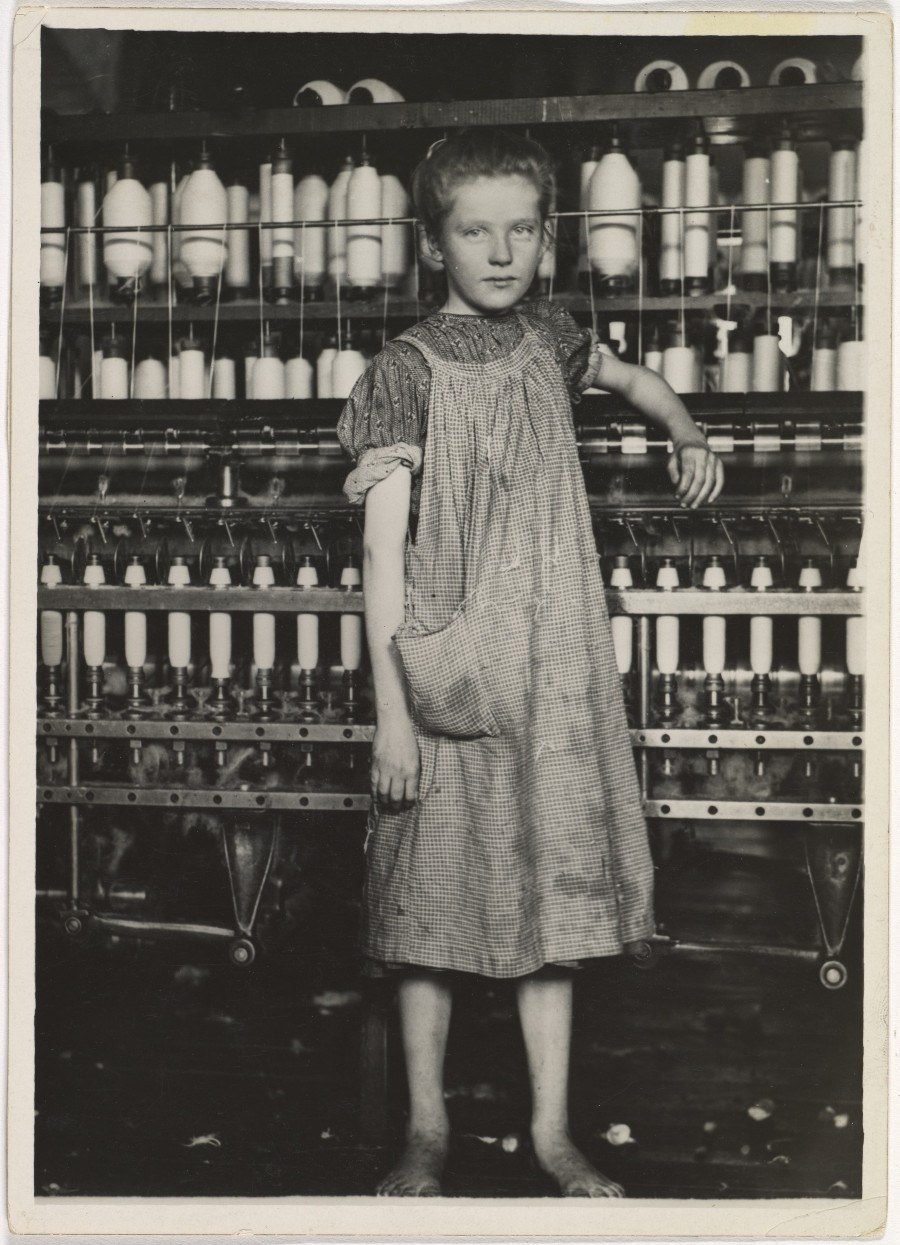
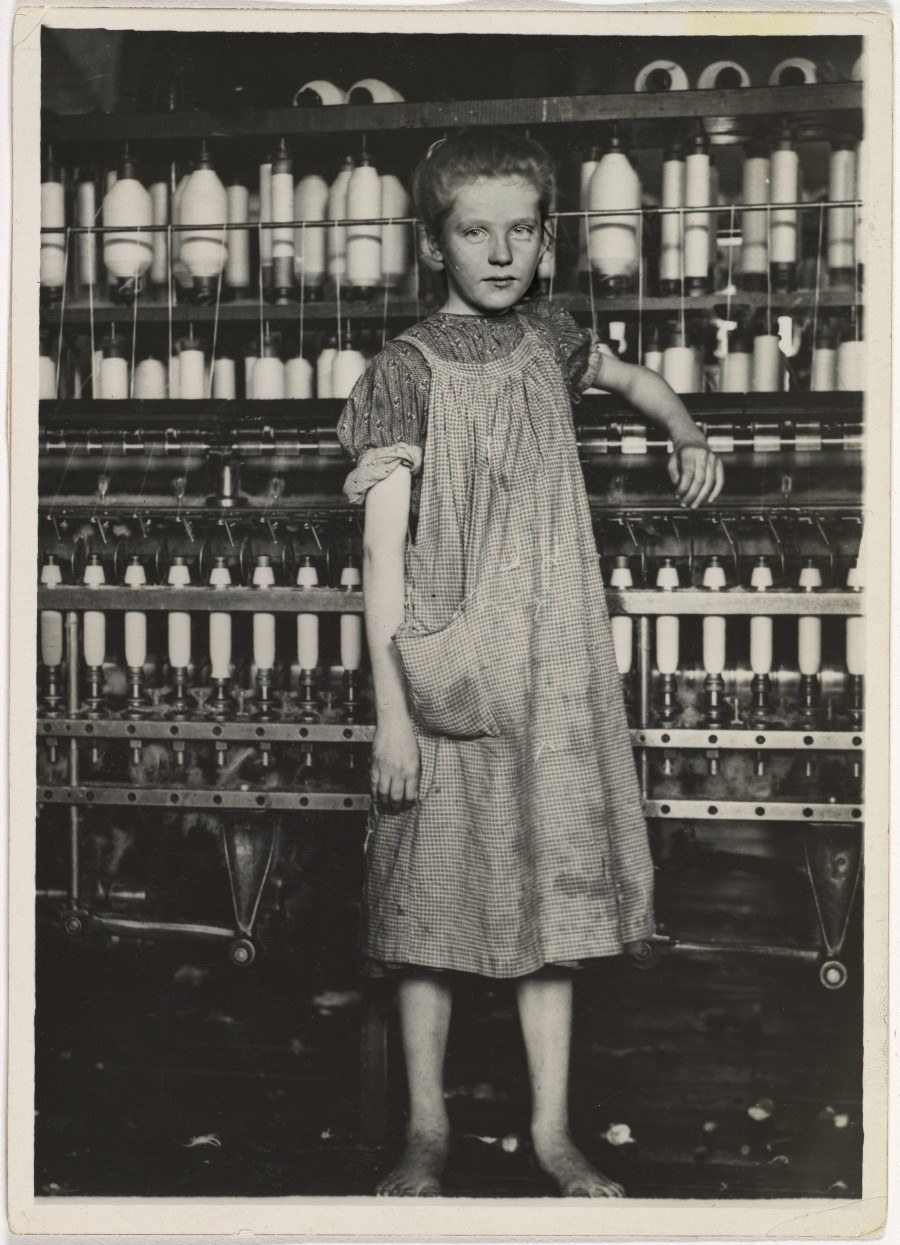 До Після
 Перетягніть повзунок — обидві пари справжні: архівні фотографії Льюїса Гайна (1910–1911), обличчя відновлені нейромережею.
Each face is restored on its own and carefully blended back in: the background, composition and tone of the shot stay untouched — sepia stays sepia, black-and-white stays black-and-white. A live slider adjusts the restoration strength even after processing, a face that didn't come out right can be switched off with one click, and the change map honestly shows where the AI touched the pixels and where it didn't. The tool deliberately skips faces that are too small: at that size a neural network no longer restores — it makes things up, and it's more honest to leave them alone. And if there are no faces in the picture at all, the tool applies an overall enhancement to the whole frame — with a fourfold upscale.
The examples above come straight from the tool's page: it has the same slider and two archival photos with the result already computed. Try those first — you won't need a photo of your own.
Залишати коментарі тут можуть лише зареєстровані користувачі з підтвердженою електронною адресою.
УвійтиSound Effects Generator
Sound engineers know this particular kind of search: you need a door creak — not just any creak, but that one, heavy, cellar-deep — and you are on the fortieth file, no longer sure how it differs from the first. Now a sound is not something you look for. It is something you describe.
We built a tool that makes sounds out of descriptions. You type “a hedgehog snuffling”, “a bartender wiping a glass”, “a car alarm at four in the morning” — in English, in your own language — and you get a sound. Not speech: it cannot pronounce words, its nature is a different one, it is about rustle and impact, about rain and creak, about what lies between words. It runs on tokens. You can download it as MP3, or as lossless WAV — 48 kilohertz, the way an editing suite expects it.
Use it in your own work: video, games, apps, podcasts, advertising.
Short effects run up to twenty-two seconds and can loop without a click — for backgrounds and game loops; long atmospheres run up to three minutes. Whatever comes out stays in your library, so you are not digging through folders later.
About the terms — plainly, no fine print. You may use the sounds in your own work, including commercially and with no time limit. You may not sell or distribute the sounds on their own — as packs, libraries or stock collections; only inside a finished work. There is no exclusivity: the same prompt from someone else will give a similar sound.
Seven examples with players are waiting on the tool page. A rooster, a thunderstorm, crying, a hedgehog, the bartender with his glass, a car alarm, a cat. It is easier to listen once: Sound Effects Generator.
Залишати коментарі тут можуть лише зареєстровані користувачі з підтвердженою електронною адресою.
УвійтиText behind the subject — and a question for you: which tools should we build next?
A new tool is now open — Text Behind Image. A neural network separates the person or object from the background and the lettering slips behind it, giving the sense of depth you see on posters and album covers. It works on photos and on video.


Усі п’ять — справжні результати інструмента: нейромережа вирізає об’єкт, і текст проходить позаду нього.
We also reworked the editor: the sliders are easier to see and to hit, text layers can now be reordered with the arrows or by dragging, and the settings panel adapts to the space available — a portrait shot no longer sits between empty side margins.
Now a question for you. Lately we have spent a lot of time on photo tools. Should we keep going that way, or turn to something else?
Яких інструментів нам варто створювати більше?
If you picked "Something else", tell us in the comments what exactly. And if you have a specific task you currently solve by hand or in some heavy program, describe it. Messages like that are what most of our new tools grow out of.
— The Tembrica team
Залишати коментарі тут можуть лише зареєстровані користувачі з підтвердженою електронною адресою.
УвійтиHow not to get lost among our tools — and why we won't release two of them
We build a lot of tools and try to release something new almost every day. We don't post about all of them here — so this page stays readable and the things that really matter don't get lost in the stream.
A tip: use bookmarks. Every tool has an "Add to bookmarks" button — save the ones you need and they'll always be at hand, so you won't have to dig through our 560-plus tools each time.
And there's more coming. By the end of the year we want to reach a thousand tools. All of it is included in the Premium subscription — you won't pay extra for each new tool.
Now, honestly — we can't release everything. Two powerful tools are finished and fully working, yet we won't publish them.
The first is voice cloning: you make a digital copy of your own voice, type some text, and it speaks in your voice. We meant it for people who narrate audiobooks. But the deeper we looked, the clearer it became: the same voice can be used to impersonate someone else. We did a lot to guard against abuse, and some of it worked — but the technology is still powerful enough to cause harm. That's a responsibility we're not taking on right now.
The second is photo animation: to bring an old photo of your grandmother or grandfather back to life. A warm idea — but here too it turned out that such technology is far too easy to turn against ordinary people and into a tool for those with bad intentions.
Here's something new that will harm no one, though — Synonyms. It'll keep growing, and we hope it's useful to you.
— The Tembrica team
Залишати коментарі тут можуть лише зареєстровані користувачі з підтвердженою електронною адресою.
УвійтиAnglicism Checker — keep your language clean
It reads context. It tells homonyms apart — a word that is native in one sense and borrowed in another is not flagged blindly. On our test set it holds 100% precision: native words are not flagged by mistake. There is a live editor with one-click replace and a whole-site scan.
Nine languages, one dictionary. Almost 8000 curated modern loanwords across 9 languages. Russian is the deepest so far — the others are still growing.
Help us make it better. Try it and test us — and if you know your language's loanwords, suggest a new word for the dictionary or point out a miss right in the tool.
Залишати коментарі тут можуть лише зареєстровані користувачі з підтвердженою електронною адресою.
УвійтиYou are our employer
Let me be honest, without pretty words. Every single day our server costs us real money — just so the site will open. Behind that cost are two people who work on the site morning and day, evening and night, like some of you. Whether that’s a lot or a little to ask — that’s for you to decide. But it’s more honest to ask than to pretend.
Some will say a site like this should be free — you’ve already paid for the internet. Then let me ask in return: what will the internet be worth, once sites like ours are gone from it? Ten years ago you could run a site on advertising. Today that money went to influencers. Games and apps become paid one after another — and the ones still called “free” too often hide viruses inside. So here’s our promise: we will not hide viruses to call our site free. We’d rather ask you plainly.
And in return you get more than a line on a price list — you get two real people. We take every letter to heart — and there are dozens every day. We fix what breaks in hours, not weeks. Under every tool we put a button: “improve this one for you personally” — and we truly sit down and improve it. Buy Premium, and you don’t just get the tools. You get the team.
We’ll keep the site open for those who can’t pay too — but honestly, the quality there is lower. The best we save for those who keep us afloat. We never set out to make everything free for everyone. Our goal is greater — to make it right for everyone. There are thousands of tools online, but only a few ever become truly convenient; and our whole advantage comes down to one thing: two people can see every single person who writes.
If you have a better idea — how we can keep from disappearing and pay for the servers where the code lives — write to support@tembrica.com, or anywhere you like on the site. We read every last letter. We build Tembrica together with you — and everyone who’s here becomes part of it. This is a unique place, and it’s yours as much as ours.
And if you don’t need Premium but still want to support the site — light a Wishing Star: leave your wish for a small contribution, quietly or for all the world to see.
And one last thing — something I truly believe. Every kindness comes back to you, sooner or later. These aren’t just pretty words: psychology calls it the “boomerang effect.” We set it in motion every day. Now you set it too. Thank you for being with us.
Залишати коментарі тут можуть лише зареєстровані користувачі з підтвердженою електронною адресою.
Увійти